NetworkingDemonstration Case Study Placeholder

Campus Network Infrastructure

A comprehensive network architecture engineering project focused on establishing resilient connectivity across multi-building campuses, integrating core routing, switch stack redundancy, structured VLAN segmentation, and secure site-to-site tunnels.

Overview

This project established a high-performance network foundation for a distributed enterprise campus requiring 99.99% uptime, strict VLAN isolation between operational departments, and automated failover across primary ISP and backup secondary links.

Problem Context

The Challenge

The legacy network suffered from broadcast storms due to a flat Layer 2 topology, lack of traffic prioritization for VoIP systems, single points of failure across core switches, and minimal visibility into bandwidth utilization per department.

Engineering Strategy

The Solution

Architected a hierarchical 3-tier network model (Core, Distribution, Access) using OSPF dynamic routing between distribution switches, LACP link aggregation for high-bandwidth switch trunks, isolated IEEE 802.1Q VLANs with strict firewall inter-VLAN policies, and IPsec site-to-site tunnels.

Architecture & System Design

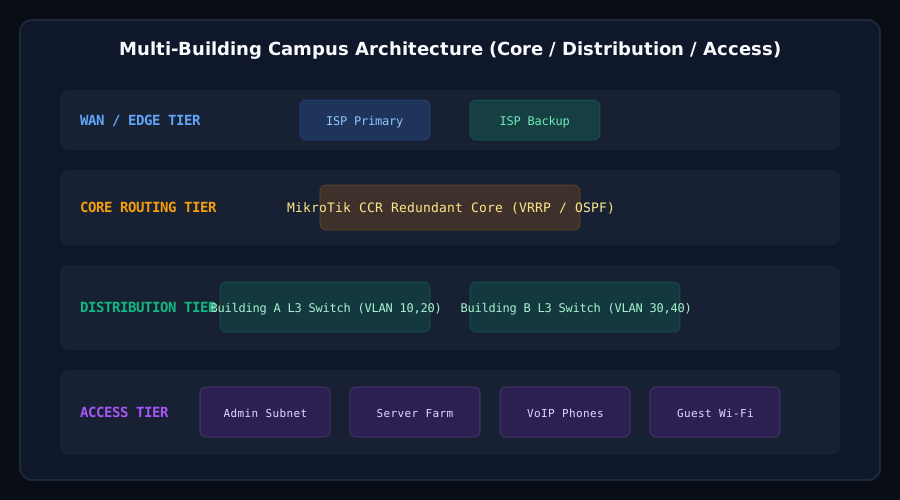
The network architecture leverages redundant Core Routers running OSPF for internal subnet routing and VRRP for gateway resiliency. VLANs separate Admin, IoT, Guest, and Server subnets at the Access layer.

Campus Network Hierarchical Architecture Diagram
Diagram: Hierarchical Core-Distribution-Access Network Architecture with Dual ISP Failover
Layer 01Core Layer

Dual MikroTik CCR routers operating active-passive VRRP with OSPF routing and multi-WAN BGP/ECMP failover.

Layer 02Distribution Layer

Managed L3 switch stack with 10GbE fiber interconnects providing inter-VLAN routing and ACL enforcement.

Layer 03Access Layer

PoE+ Managed Access switches configured with Port Security, DHCP Snooping, and 802.1X authentication.

Layer 04Edge & VPN

Dedicated IPsec / WireGuard VPN gateways for secure remote access and branch office inter-site mesh connectivity.

Implementation Steps

  1. 01

    Conducted physical and logical network audit to identify topology bottlenecks and cable run limitations.

  2. 02

    Designed standard IP subnetting schema using CIDR allocation and VLAN mapping per building/department.

  3. 03

    Deployed core MikroTik and Cisco switches with redundant power supplies and LACP trunking.

  4. 04

    Configured OSPF dynamic routing, BGP multi-WAN failover scripts, and QoS queues for VoIP latency protection.

  5. 05

    Implemented switch hardening: disabled unused ports, enabled BPDU Guard, Loop Protect, and DHCP Snooping.

  6. 06

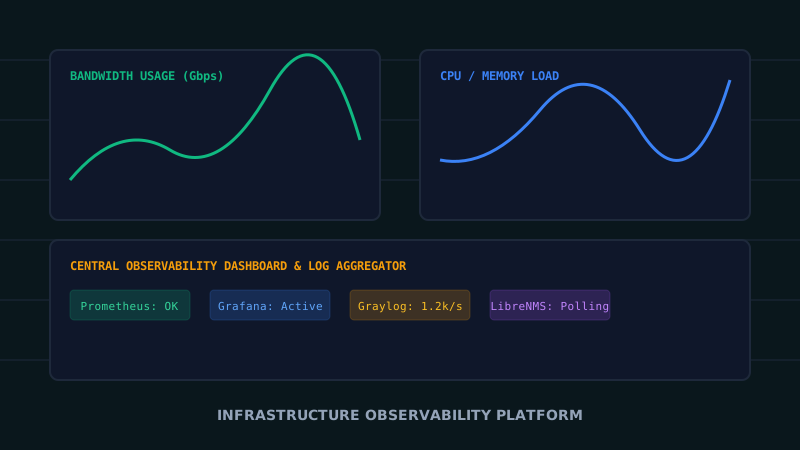
    Integrated SNMP polling with centralized network management tools for realtime link alerts.

Key Responsibilities

  • Hierarchical network topology design and IP addressing planning.
  • Hands-on router and switch CLI configuration and firmware deployment.
  • Implementing firewall rules, NAT tables, and VPN gateway access policies.
  • Documenting network diagrams, rack elevations, and patch panel mapping.
  • Performing failover stress testing and traffic throughput optimization.

Challenges & Technical Solutions

Challenge

Broadcast storms and STP topology changes causing intermittent connectivity loss.

Solution

Configured Rapid Spanning Tree Protocol (RSTP) with explicit Root Bridge priority assignment and BPDU Guard on all edge ports.

Challenge

Unrestricted inter-department traffic access exposing sensitive database servers.

Solution

Implemented stateful firewall rules restricting inter-VLAN traffic, allowing only explicitly required port communications.

Results & Impact

  • Eliminated network broadcast loops and reduced broadcast traffic noise by over 80%.
  • Achieved seamless WAN link failover with under 3 seconds packet drop during primary ISP outage tests.
  • Established clear traffic isolation and security enforcement between guest users and core infrastructure.
  • Standardized switch deployment configurations across all campus distribution racks.

Lessons Learned

  • 01Comprehensive network documentation and port labelling before migration prevents hours of troubleshooting.
  • 02Strict port-security policies must be accompanied by end-user IT onboarding guidelines.
  • 03Automated configuration backup scripts save significant recovery time during unexpected hardware failures.
Explore More

Discuss Similar Infrastructure Needs?

If you need assistance designing or auditing your network, hypervisor, or monitoring platform, let's talk.

Get In Touch